Why this matters
Most local LLM testing still starts with a runner: Ollama, LM Studio, llama.cpp, MLX, a hosted API, or a notebook. Chrome changes the shape of the question. If the browser itself can expose a local model to web apps, then local inference stops being a specialist desktop setup and becomes something ordinary software can reach.
That does not make the model good at serious work. It makes the runtime interesting. The practical question is not whether a browser can answer a prompt. The practical question is whether a browser-local model can finish a small, boring, structured job without turning the final artifact into mush.
What Chrome exposes
Chrome's current developer documentation describes the Prompt API as a built-in AI API using Gemini Nano in Chrome. In this test environment, the browser exposed `LanguageModel.availability()`, `LanguageModel.create()`, and `session.prompt()`. The first call reported that the model was downloadable. After a user-activated button flow, Chrome downloaded the local model into the browser profile and then reported the runtime as available.
That means the benchmark did not call a cloud model for the actual prompt once the browser model was installed. It used a local Chrome runtime. From a product point of view, that is the notable part: a web page can potentially use a local model through the browser, with no separate LM Studio server and no OpenRouter key.
The benchmark setup
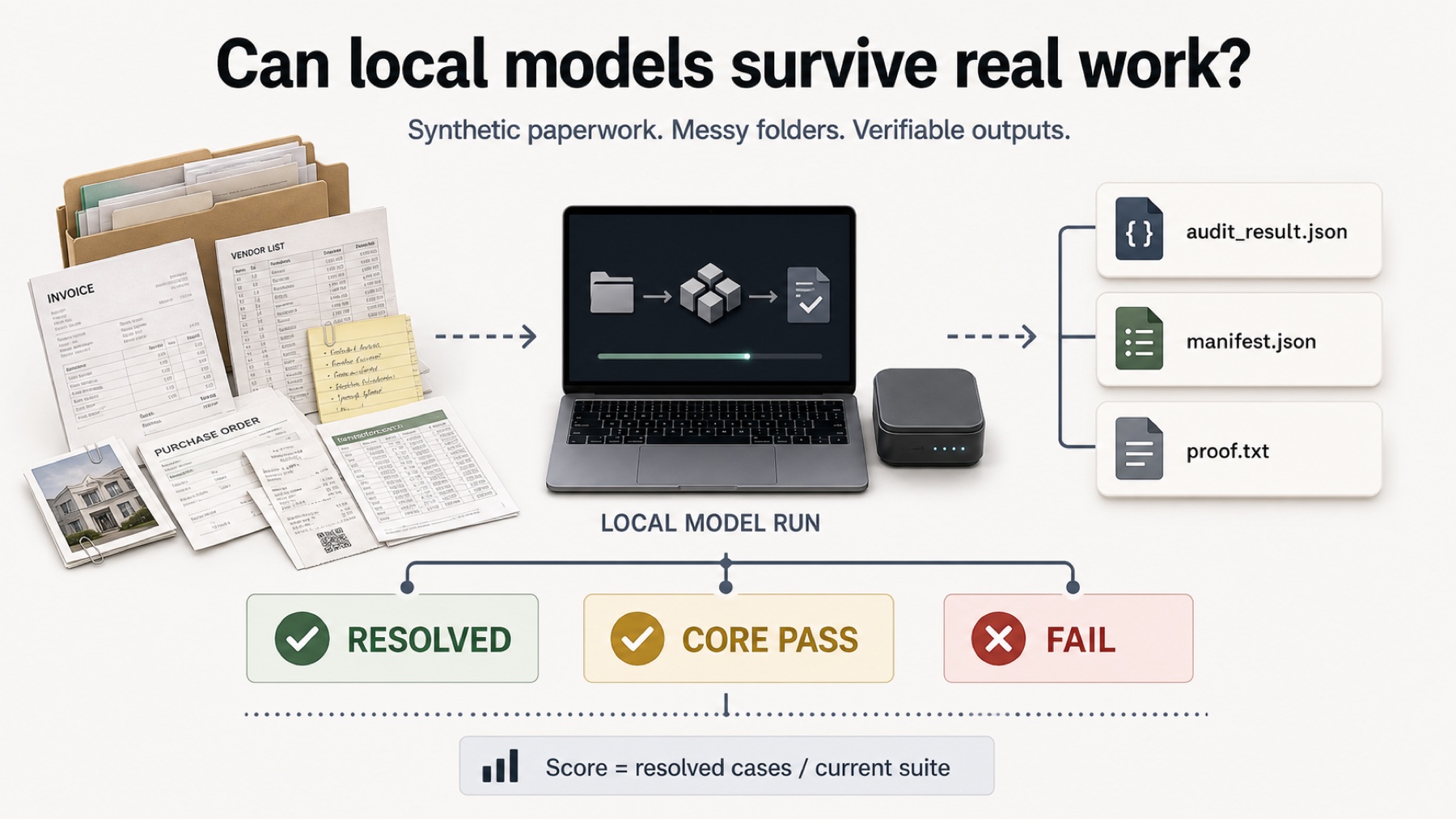
We did not put Chrome Gemini Nano into the image-based paperwork leaderboard. The available browser API path in this run was text-only, so the fair comparison was the Paperwork Text-Only diagnostic benchmark. That benchmark gives the model normalized document extracts, CSV content, and task instructions instead of raw generated invoice scans.
The model still had to return a strict `audit_result.json`. The score was not based on whether the answer sounded useful. It was checked against visible output requirements, core audit facts, hidden oracle fields, and final proof-code closure.
- 5 text-only paperwork cases
- 0 strict resolved cases
- 1 core pass
- 2 malformed JSON outputs
- 1 separate City Plan SVG sample
What worked
The first useful result is simple: the browser runtime worked. Chrome downloaded the local model, created a session, and answered prompts. That alone makes the run worth documenting because it moves local AI from the runner layer into the browser layer.
The model also showed partial bookkeeping ability. In Case 01, it identified the right invoice set, warning situation, ignored document, and approved total closely enough to earn a core pass. That is not nothing. It means the model was not merely echoing input text. It did some of the audit logic.
Where it broke
The failures are exactly the kind of failures Local Model Bench is designed to catch. Case 02 and Case 05 returned malformed JSON because the proof code was emitted as an arithmetic expression instead of a final number. Other cases produced JSON but missed enough classification, evidence, warning, total, or proof details to fail the oracle.
This is the difference between a demo and a usable workflow. A human can often read the answer and see what the model was trying to do. A downstream system cannot use a proof code written as a formula when the schema requires an integer. A private paperwork workflow does not end at plausible prose.
The SVG sanity check
We also ran the separate City Plan SVG prompt. Chrome Gemini Nano returned a valid standalone SVG and avoided Markdown. The artifact rendered on the site. But the visual result was too flat and too simple for the stricter city-plan 3D or isometric-building constraint, so it scored 2/3 rather than a clean pass.
That result fits the broader pattern. The browser model can produce usable structured text and valid vector output, but exact constraint satisfaction is still uneven.
Practical readout
Chrome Gemini Nano is not a paperwork worker yet. It is a browser-local model runtime that can complete some steps and fail hard on final closure. That is still important. Local inference becoming available inside Chrome changes where software can run small AI tasks.
The conservative conclusion is the useful one: browser-local AI is real, but exact private-work automation still needs verification, schemas, hidden checks, and probably a stronger model than this first Gemini Nano result.